Now available for WordPress

Reuse the blocks you build on every site you build

Save the heroes, pricing tables, and CTAs you design yourself to a personal cloud library, then drop them onto any WordPress site in one click. Not a block pack — your own blocks, everywhere you work.

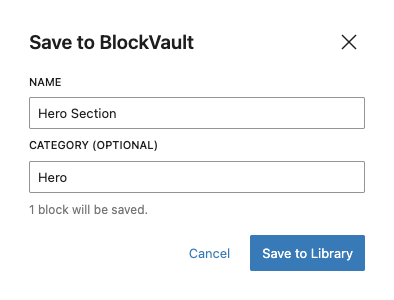
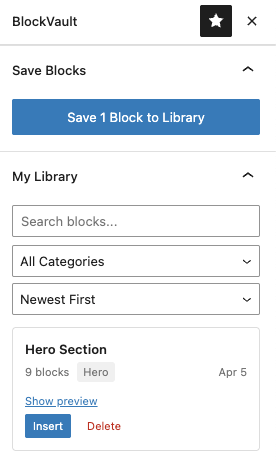
1. Save a block BlockVault library with saved block
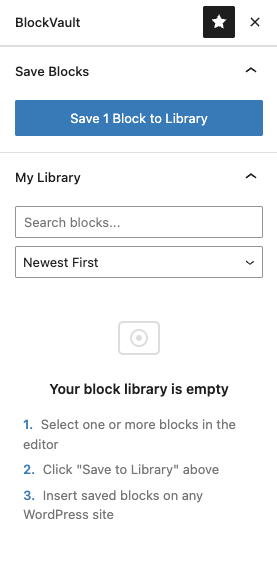
2. Name & Categorize Save blocks to BlockVault
3. Insert anywhere BlockVault library with saved block

Built for WordPress professionals

On the official WordPress.org directory
Free forever plan — no card to start
Works with any Gutenberg theme

Everything you need to build faster

Save, organize, and reuse your best Gutenberg blocks across every WordPress site you manage.

One-Click Save

Select any blocks in the editor, click save, done. Works with single blocks or entire sections.

Cross-Site Sync

Access your block library from any WordPress site. Build on one, reuse everywhere.

Search & Filter

Organize blocks by category. Search by name. Sort by date or alphabetically. Find anything in seconds.

Full Style Transfer

Colors, fonts, and spacing transfer automatically. Pro plans also capture custom theme CSS so blocks look identical on any site.

Insert Anywhere

Browse your library in the sidebar. Click insert. The blocks appear exactly where you need them.

Works Offline

No account needed to start. BlockVault works locally with browser storage. Upgrade to cloud when ready.

How it works

Three steps. Thirty seconds. Never rebuild a section again.

1

Design your blocks

Build a hero section, pricing table, CTA, or any layout in the Gutenberg editor on any WordPress site.

2

Save to BlockVault

Select the blocks, click "Save to BlockVault" in the sidebar or right-click menu. Name it, categorize it.

3

Insert on any site

Open BlockVault on another site, find your block, click insert. Done. Colors and styles transfer automatically.

It pays for itself the first time you reuse a block

If you bill for your time, the math isn't close.

~40 min

Saved every time you reuse a hero, pricing table, or CTA instead of rebuilding it from scratch.

$99/yr

The Pro plan costs about one billable hour — for the entire year.

16× back

Reuse two blocks a month and you save roughly 16 hours a year, for the price of one.

Rebuild one section a month and BlockVault has already paid for itself. Based on a $100/hr rate. Your numbers are probably higher.

Simple, transparent pricing

Start free. Upgrade when you need cross-site sync.
Install the plugin and create your free account first, then upgrade here using the same email.

Free

Perfect for trying it out

$ 0

Free forever

Download Plugin
  • 10 saved blocks
  • Local browser storage
  • 3 categories
  • Block notes & favorites
  • Collections & cloud sync

Pro

For growing businesses

$ 99 /year

Billed annually

Get Pro Plan
  • Unlimited blocks
  • 10 sites cloud sync
  • Block notes & favorites
  • Unlimited collections
  • CSS capture
  • Priority support

Agency

For teams & agencies

$ 149 /year

Billed annually

Get Agency Plan
  • Unlimited everything
  • Unlimited collections
  • Revision history
  • CSS capture
  • Priority support + onboarding

Frequently asked questions

No. Without an account, BlockVault works in local mode with blocks saved in your browser. Create an account to sync across sites.

Yes. BlockVault automatically converts theme-dependent colors, gradients, and font sizes into inline styles so they look the same on any site, regardless of the active theme.

Yes. BlockVault works with any theme that supports the Gutenberg block editor, including Astra, Kadence, GeneratePress, Twenty Twenty-Four, and all Full Site Editing themes.

Your blocks stay in your library. You'll be moved to the free plan with a 10-block limit. Existing blocks beyond the limit remain accessible but you won't be able to add new ones until you're under the limit.

Yes. We offer a 14-day money-back guarantee. If you're not happy, email us and we'll refund you, no questions asked.

Those plugins add new block types to the Gutenberg inserter. BlockVault doesn't add new blocks — it saves and syncs the compositions you build. The two are complementary: build a hero section using UAG, Kadence, or core blocks, then save that composition to your BlockVault library and insert it on any other site in one click.

WordPress's built-in Reusable Blocks are stored in one site's database. They can't be moved to another WordPress install without exporting and importing. BlockVault stores your blocks in a personal cloud library tied to your account, so you can insert them on any site connected to that account. Built-in Reusable Blocks also "sync" any edit back to every instance — BlockVault inserts a fresh copy you're free to customize per site.

No. Multisite is overkill for freelance work where each client site lives on its own hosting account, its own domain, and often its own theme. BlockVault works on any standard WordPress install. Your library lives in the cloud, not inside any single WP install.

BlockVault is built specifically for the Gutenberg block editor. Page builders like Elementor and Divi use their own internal data formats, not Gutenberg block markup, so blocks built inside those builders cannot be saved through BlockVault. If you use the Gutenberg editor (with or without additional block plugins like UAG, Kadence, GenerateBlocks, or CoBlocks), BlockVault works.

Stop rebuilding. Start reusing.

Save your first block in under a minute, and never rebuild the same section twice.

Get BlockVault Free